
Kbox MITT TB15 - Mitsubishi Electric TB15 KNX Gateway
Características del Producto
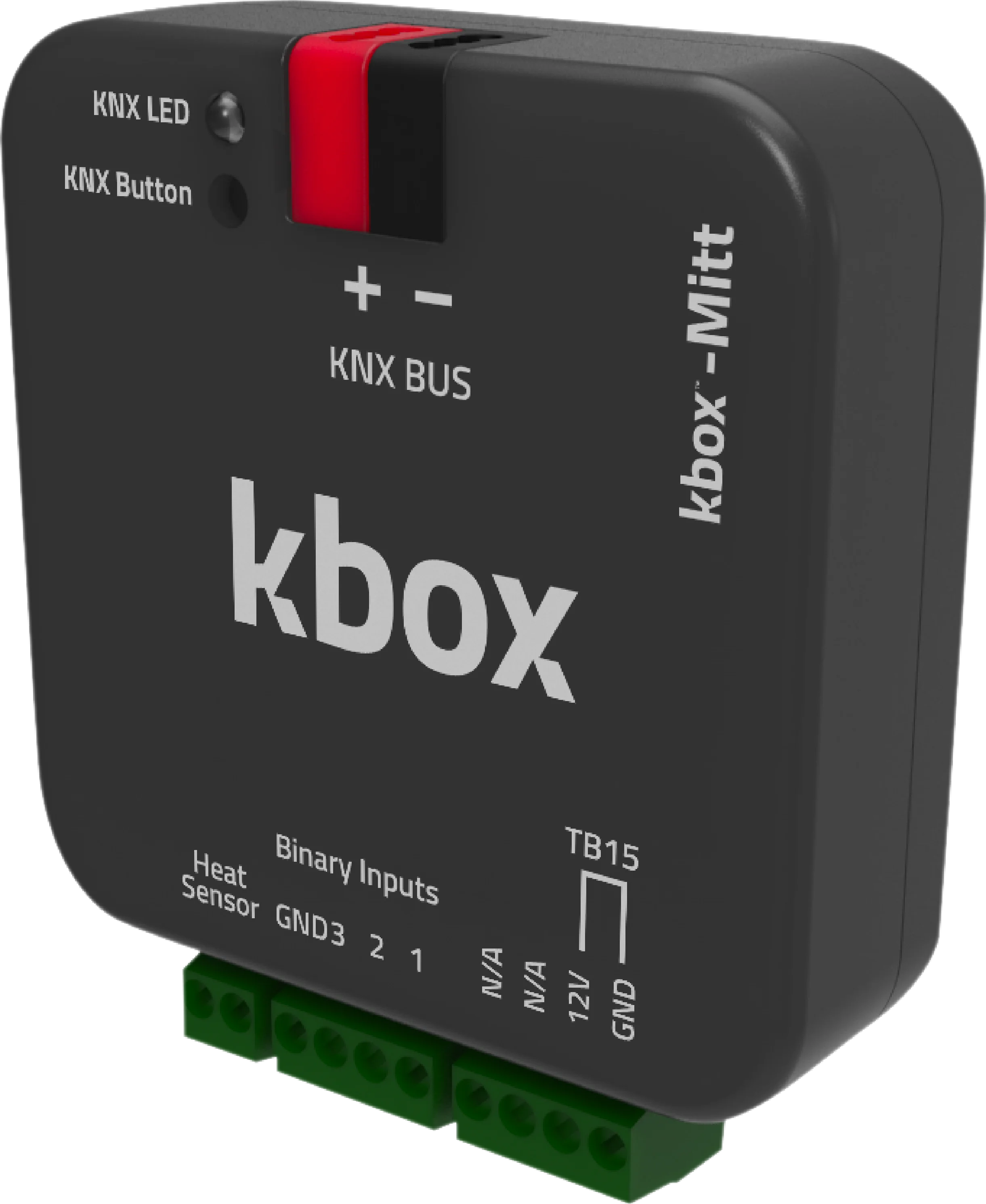
kbox-Mitt es un gateway KNX que permite la comunicación bidireccional entre sistemas de hogar inteligente KNX y sistemas de aire acondicionado Mitsubishi Electric.
Con kbox-Mitt, todas las funciones de los aires acondicionados Mitsubishi Electric pueden controlarse a través del sistema KNX. Facilita la comunicación bidireccional perfecta, transmitiendo datos de temperatura en tiempo real desde smartphones, tablets, computadoras o controladores KNX a la unidad interior del aire acondicionado.
kbox-Mitt trabaja eficientemente con varios escenarios, asegurando ninguna carga adicional en el sistema de hogar inteligente. Soporta ahorro de energía, límites de temperatura, programación y programación de operación. Se envían comandos en tiempo real adaptados a estos escenarios, mejorando la eficiencia energética.
A diferencia de los competidores, kbox-Mitt se distingue transfiriendo datos de temperatura ambiente del panel KNX al aire acondicionado a través del puerto TB15. Este enfoque único garantiza operación estable, temperaturas interiores cómodas y eficiencia energética superior.
Los productos competidores frecuentemente usan el puerto CN105 para la transmisión de datos, que no está optimizado para actualizaciones de temperatura ambiente en tiempo real. Esto resulta en ineficiencia energética y control de temperatura menos preciso. kbox-Mitt, el único gateway KNX compatible globalmente con aires acondicionados Mitsubishi Electric a través del puerto TB15, proporciona una ventaja de costo significativa sobre los competidores.
Con sus características excepcionales, kbox-Mitt es el gateway KNX más eficiente para su hogar inteligente.
Documentos y Descargas
Catálogo Turco
Catálogo Inglés
Hoja de Datos
Manual de Usuario
Contenido de la Caja
- Gateway KNX Kbox-MITT
- Terminal Wago KNX
Lista de Compatibilidad
| UNIDADES INTERIORES TIPO PAC | UNIDADES INTERIORES TIPO RAC | UNIDADES INTERIORES TIPO CITY MULTI VRF |
| PCA-RP | MFZ-KA | PCFY-P … VKM-ER |
| PEAD-RP | MFZ-KJ | PEFY-P … VMA-E |
| PEAD-SP | MLZ-KA | PEFY-P … VMA-ER3 |
| PLA-RP | MSZ-CGE | PEFY-P … VMAL-E |
| PLA-ZRP | MSZ-EF | PEFY-P … -VMH(S)-E1 |
| PKA-RP | MSZ-FA | PEFY-P … VMR-E1 |
| PSA-RP | MSZ-FD | PEFY-P … VMS1-E |
| SEZ-KA/KC | MSZ-FH | PFFY-P … VKM-E2 |
| SEZ-KD | MSZ-GA | PFFY-P … VLRM/LEM |
| SLZ-KA | MSZ-GB | PFFY-P … VLRMM-E¹ |
| SLZ-KF | MSZ-GC | PFFY-P … VFM-E |
| PEAD-RP…JALQR3 | MSZ-GE | PKFY-P … VHM-ER2¹ |
| MSZ-GF | PKFY-P … VKM-ER1¹ | |
| MSZ-SF | PLFY-P … VBM-ER3¹ | |
| MSZ-DM | PLFY-P … VCM-ER2¹ | |
| MSZ-LN | PLFY-P … VLDM-E | |
| MSZ-WN | PMFY-P … VBM-E#2 | |
| PMFY-P … VBM-ER3 | ||
| PMFY-P … VBM-ER41 |
Especificaciones Técnicas
| Dispositivo | Kbox MITT TB15 - Mitsubishi Electric TB15 KNX Gateway |
|---|---|
| Marca del aire acondicionado | Mitsubishi Electric |
| Puerto de conexión | TB15 |
| Unidades interiores compatibles | PAC, RAC, City Multi VRF, Mr.Slim |
| Versión de la aplicación ETS | 1.0.8 |
| N.º de certificado KNX | 574/22153/25 (KNX v3.0.4) |
| Alimentación | KNX bus (EIB) |
| Consumo | 10 mA |
| Entradas | 3 entradas de contacto seco |
| Pulsador / LED | 1 × KNX programming button · 1 × KNX programming LED |
| Modo de funcionamiento | S-Mode |
| Grado de protección | IP20 |
| Temperatura de funcionamiento | -10 °C … +70 °C |
| Temperatura de almacenamiento | -25 °C … +90 °C |
| Humedad máx. | < 90 % RH |
| Dimensiones | 44.5 × 19.8 × 44.5 mm |
| Configuración | ETS 5 / ETS 6 |
Parámetros ETS
El dispositivo se conecta a la unidad interior Mitsubishi Electric mediante el puerto TB15. Los parámetros siguientes se configuran en ETS.
| Modos de funcionamiento | Cool / Heat / Dry / Fan Only / Auto |
|---|---|
| Velocidad del ventilador | 5 niveles + Auto |
| Lama vertical (Up-Down Wing) | 5 posiciones direccionables + Swing |
| Lama horizontal (Left-Right Wing) | Sí |
| Rango de consigna en refrigeración | 19 – 30 °C |
| Rango de consigna en calefacción | 17 – 28 °C |
| Fuente de temperatura ambiente | Desde el bus KNX (From Bus) |
| Unidades lógicas y aritméticas | 10 funciones, cada una con 7 operaciones lógicas, 4 aritméticas, 6 de comparación y 3 de conversión de tipo |
| Función de escenas (Scene) | Sí |
| Contacto de ventana / presencia / sleep | Sí |
Objetos de Grupo KNX
El dispositivo ofrece 70 objetos de grupo. Los nombres de los objetos se indican tal como aparecen en la base de datos de ETS.
| Objeto | Función | Tipo | Flags |
|---|---|---|---|
| General | |||
| On/Off | 1: On / 0: Off | 1 bit | CWU |
| On/Off Feedback | 1: On / 0: Off | 1 bit | CRT |
| Alive Status | Alive notification | 1 bit | CRT |
| Remote Controller Lock | 1: Enabled / 0: Disabled | 1 bit | CRWU |
| Object Control Lock | 1: Enabled / 0: Disabled | 1 bit | CRWU |
| Error Status | ASCII error code | 14 bytes | CRT |
| Error Alarm | 1: On / 0: Off | 1 byte | CRT |
| Mode | |||
| Mode | Cool / Heat / Dry (Dehumidification) / Fan (Fan Only) / Auto | 1 byte | CWU |
| Mode Feedback | Cool / Heat / Dry (Dehumidification) / Fan (Fan Only) / Auto | 1 byte | CRT |
| Mode +/- | 1: Increase / 0: Decrease | 1 bit | CWU |
| Heat/Cool Mode Set | 1: Heat / 0: Cool | 1 bit | CWU |
| Cool Mode Set | 1: Enable / 0: Disable | 1 bit | CWU |
| Heat Mode Set | 1: Enable / 0: Disable | 1 bit | CWU |
| Dry (Dehumidification) Mode Set | 1: Enable / 0: Disable | 1 bit | CWU |
| Fan (Fan Only) Mode Set | 1: Enable / 0: Disable | 1 bit | CWU |
| Auto Mode Set | 1: Enable / 0: Disable | 1 bit | CWU |
| Cool Mode Feedback | 1: Enable / 0: Disable | 1 bit | CRT |
| Heat Mode Feedback | 1: Enable / 0: Disable | 1 bit | CRT |
| Dry (Dehumidification) Mode Feedback | 1: Enable / 0: Disable | 1 bit | CRT |
| Fan (Fan Only) Mode Feedback | 1: Enable / 0: Disable | 1 bit | CRT |
| Auto Mode Feedback | 1: Enable / 0: Disable | 1 bit | CRT |
| Temperature | |||
| Set Point Temperature | Temperature (°C) | 2 bytes | CWU |
| Set Point Temperature Feedback | Temperature (°C) | 2 bytes | CRT |
| Set Point Temperature +/- | 1: Increase / 0: Decrease | 1 bit | CWU |
| Ambient Temperature | Temperature (°C), min 8 / max 39 | 2 bytes | CWU |
| Ambient Temperature Feedback | Temperature (°C) | 2 bytes | CRT |
| Fan | |||
| Fan Level Set | Percentage (Scaling) | 1 byte | CWU |
| Fan Level Feedback | Percentage (Scaling) | 1 byte | CRT |
| Fan Level Set | 0…5 (Enumerated) | 1 byte | CWU |
| Fan Level Feedback | 0…5 (Enumerated) | 1 byte | CRT |
| Fan Level +/- Set | 1: Increase / 0: Decrease | 1 bit | CWU |
| Fan Auto Level | 1: Enable / 0: Disable | 1 bit | CWU |
| Fan Auto Level Feedback | 1: Enable / 0: Disable | 1 bit | CRT |
| Fan Level-1 Set | 1: Enable / 0: Disable | 1 bit | CWU |
| Fan Level-2 Set | 1: Enable / 0: Disable | 1 bit | CWU |
| Fan Level-3 Set | 1: Enable / 0: Disable | 1 bit | CWU |
| Fan Level-4 Set | 1: Enable / 0: Disable | 1 bit | CWU |
| Fan Level-5 Set | 1: Enable / 0: Disable | 1 bit | CWU |
| Fan Level-1 Feedback | 1: Enable / 0: Disable | 1 bit | CRT |
| Fan Level-2 Feedback | 1: Enable / 0: Disable | 1 bit | CRT |
| Fan Level-3 Feedback | 1: Enable / 0: Disable | 1 bit | CRT |
| Fan Level-4 Feedback | 1: Enable / 0: Disable | 1 bit | CRT |
| Fan Level-5 Feedback | 1: Enable / 0: Disable | 1 bit | CRT |
| Up-Down Wing | |||
| Up-Down Position Swing Set | 1: Enabled / 0: Disabled | 1 bit | CWU |
| Up-Down Position Swing Feedback | 1: Enabled / 0: Disabled | 1 bit | CRT |
| Up-Down Wing Set | Percentage (Scaling) | 1 byte | CWU |
| Up-Down Wing Feedback | Percentage (Scaling) | 1 byte | CRT |
| Up-Down Wing Set | 1…5 (Enumerated) | 1 byte | CWU |
| Up-Down Wing Feedback | 1…5 (Enumerated) | 1 byte | CRT |
| Up-Down Wing +/- Set | 1: Increase / 0: Decrease | 1 bit | CWU |
| Up-Down Wing Position 1 Set | 1: Set Position 1 / 0: NA | 1 bit | CWU |
| Up-Down Wing Position 2 Set | 1: Set Position 2 / 0: NA | 1 bit | CWU |
| Up-Down Wing Position 3 Set | 1: Set Position 3 / 0: NA | 1 bit | CWU |
| Up-Down Wing Position 4 Set | 1: Set Position 4 / 0: NA | 1 bit | CWU |
| Up-Down Wing Position 5 Set | 1: Set Position 5 / 0: NA | 1 bit | CWU |
| Up-Down Wing Position 1 Feedback | 1: Active / 0: Inactive | 1 bit | CRT |
| Up-Down Wing Position 2 Feedback | 1: Active / 0: Inactive | 1 bit | CRT |
| Up-Down Wing Position 3 Feedback | 1: Active / 0: Inactive | 1 bit | CRT |
| Up-Down Wing Position 4 Feedback | 1: Active / 0: Inactive | 1 bit | CRT |
| Up-Down Wing Position 5 Feedback | 1: Active / 0: Inactive | 1 bit | CRT |
| Left-Right Wing | |||
| Left-Right Position Swing Set | 1: Enabled / 0: Disabled | 1 bit | CWU |
| Left-Right Position Swing Feedback | 1: Enabled / 0: Disabled | 1 bit | CRT |
| Energy Saving | |||
| Window Contact | 1: Enable / 0: Disable | 1 bit | CWU |
| Window Contact Feedback | 1: Enable / 0: Disable | 1 bit | CRT |
| Occupancy Contact | 1: Enable / 0: Disable | 1 bit | CWU |
| Occupancy Contact Feedback | 1: Enable / 0: Disable | 1 bit | CRT |
| Sleep Contact | 1: Enable / 0: Disable | 1 bit | CWU |
| Digital Inputs | |||
| Digital Input 1 | 1: Active / 0: Passive | 1 bit | CWU |
| Digital Input 2 | 1: Active / 0: Passive | 1 bit | CWU |
| Digital Input 3 | 1: Active / 0: Passive | 1 bit | CWU |
Flags: C = Comunicación, R = Lectura, W = Escritura, T = Transmisión, U = Actualización.