
Kbox MITT TB15 - Mitsubishi Electric TB15 KNX Gateway
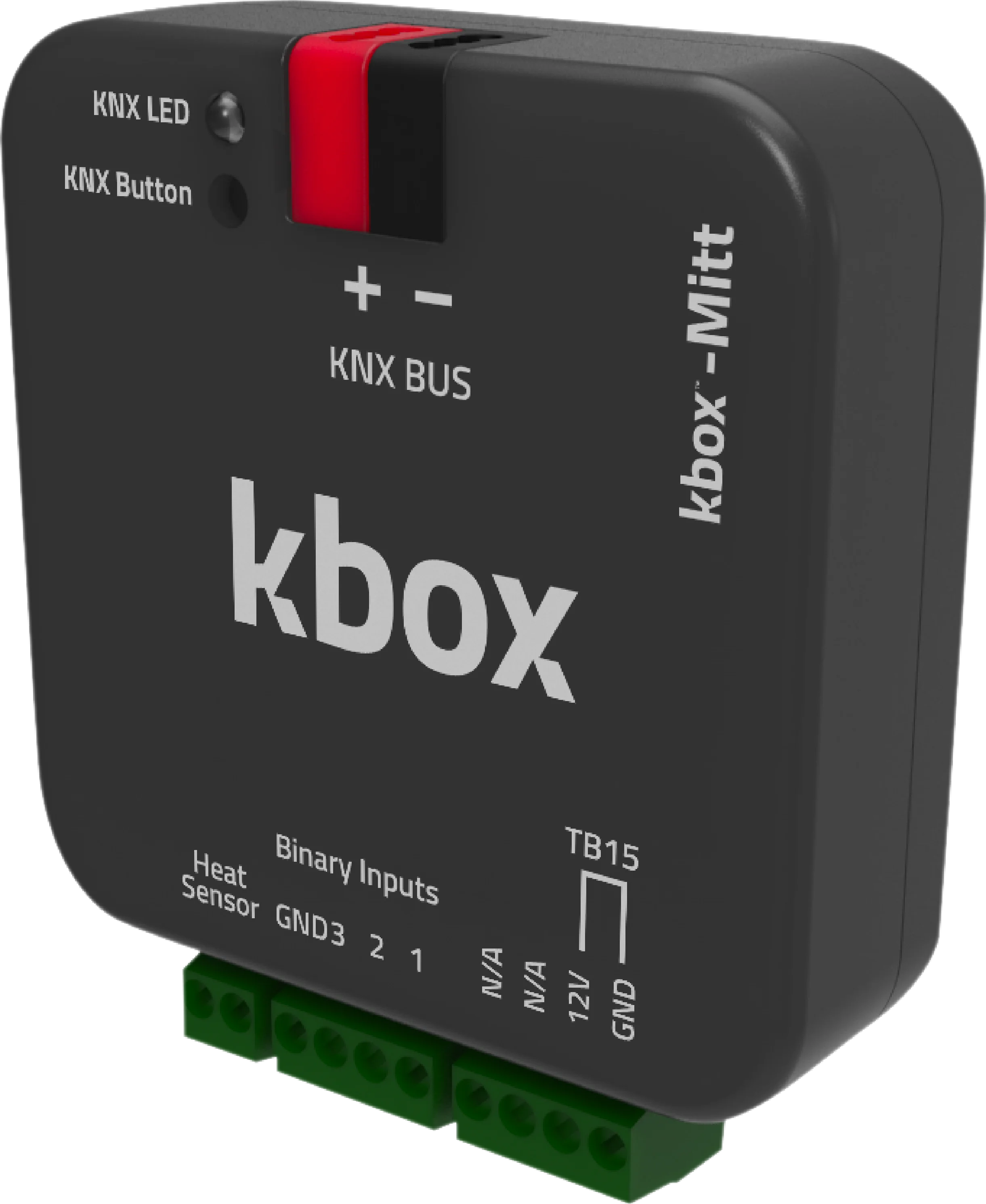
Caratteristiche del Prodotto
kbox-Mitt è un gateway KNX che abilita la comunicazione bidirezionale tra i sistemi di casa intelligente KNX e i sistemi di condizionamento Mitsubishi Electric.
Con kbox-Mitt, tutte le funzioni dei condizionatori Mitsubishi Electric possono essere controllate attraverso il sistema KNX. Facilita la comunicazione bidirezionale senza interruzioni, trasmettendo dati di temperatura in tempo reale da smartphone, tablet, computer o controller KNX all'unità interna del condizionatore.
kbox-Mitt lavora efficientemente con vari scenari, garantendo nessun carico aggiuntivo sul sistema di casa intelligente. Supporta risparmio energetico, limiti di temperatura, pianificazione e programmazione operativa. Vengono inviati comandi in tempo reale adattati a questi scenari, migliorando l'efficienza energetica.
A differenza dei concorrenti, kbox-Mitt si distingue trasferendo dati di temperatura ambientale dal pannello KNX al condizionatore tramite la porta TB15. Questo approccio unico garantisce operazione stabile, temperature interne confortevoli e superiore efficienza energetica.
I prodotti concorrenti spesso usano la porta CN105 per la trasmissione di dati, che non è ottimizzata per gli aggiornamenti della temperatura ambientale in tempo reale. Ciò risulta in inefficienza energetica e controllo della temperatura meno preciso. kbox-Mitt, l'unico gateway KNX compatibile globalmente con i condizionatori Mitsubishi Electric tramite la porta TB15, fornisce un significativo vantaggio di costo rispetto ai concorrenti.
Con le sue caratteristiche eccezionali, kbox-Mitt è il gateway KNX più efficiente per la tua casa intelligente.
Documenti e Download
Catalogo Turco
Catalogo Inglese
Scheda Tecnica
Manuale Utente
Contenuto della Confezione
- Gateway KNX Kbox-MITT
- Morsetto Wago KNX
Lista di Compatibilità
| UNITÀ INTERNE TIPO PAC | UNITÀ INTERNE TIPO RAC | UNITÀ INTERNE TIPO CITY MULTI VRF |
| PCA-RP | MFZ-KA | PCFY-P … VKM-ER |
| PEAD-RP | MFZ-KJ | PEFY-P … VMA-E |
| PEAD-SP | MLZ-KA | PEFY-P … VMA-ER3 |
| PLA-RP | MSZ-CGE | PEFY-P … VMAL-E |
| PLA-ZRP | MSZ-EF | PEFY-P … -VMH(S)-E1 |
| PKA-RP | MSZ-FA | PEFY-P … VMR-E1 |
| PSA-RP | MSZ-FD | PEFY-P … VMS1-E |
| SEZ-KA/KC | MSZ-FH | PFFY-P … VKM-E2 |
| SEZ-KD | MSZ-GA | PFFY-P … VLRM/LEM |
| SLZ-KA | MSZ-GB | PFFY-P … VLRMM-E¹ |
| SLZ-KF | MSZ-GC | PFFY-P … VFM-E |
| PEAD-RP…JALQR3 | MSZ-GE | PKFY-P … VHM-ER2¹ |
| MSZ-GF | PKFY-P … VKM-ER1¹ | |
| MSZ-SF | PLFY-P … VBM-ER3¹ | |
| MSZ-DM | PLFY-P … VCM-ER2¹ | |
| MSZ-LN | PLFY-P … VLDM-E | |
| MSZ-WN | PMFY-P … VBM-E#2 | |
| PMFY-P … VBM-ER3 | ||
| PMFY-P … VBM-ER41 |
Specifiche Tecniche
| Dispositivo | Kbox MITT TB15 - Mitsubishi Electric TB15 KNX Gateway |
|---|---|
| Marca del climatizzatore | Mitsubishi Electric |
| Porta di collegamento | TB15 |
| Unità interne compatibili | PAC, RAC, City Multi VRF, Mr.Slim |
| Versione applicativo ETS | 1.0.8 |
| N. certificato KNX | 574/22153/25 (KNX v3.0.4) |
| Alimentazione | KNX bus (EIB) |
| Consumo | 10 mA |
| Ingressi | 3 ingressi a contatto pulito |
| Pulsante / LED | 1 × KNX programming button · 1 × KNX programming LED |
| Modo operativo | S-Mode |
| Grado di protezione | IP20 |
| Temperatura di funzionamento | -10 °C … +70 °C |
| Temperatura di stoccaggio | -25 °C … +90 °C |
| Umidità max. | < 90 % RH |
| Dimensioni | 44.5 × 19.8 × 44.5 mm |
| Configurazione | ETS 5 / ETS 6 |
Parametri ETS
Il dispositivo si collega all'unità interna Mitsubishi Electric tramite la porta TB15. I parametri seguenti si configurano in ETS.
| Modi di funzionamento | Cool / Heat / Dry / Fan Only / Auto |
|---|---|
| Velocità ventilatore | 5 livelli + Auto |
| Aletta verticale (Up-Down Wing) | 5 posizioni indirizzabili + Swing |
| Aletta orizzontale (Left-Right Wing) | Sì |
| Intervallo setpoint in raffrescamento | 19 – 30 °C |
| Intervallo setpoint in riscaldamento | 17 – 28 °C |
| Sorgente della temperatura ambiente | Dal bus KNX (From Bus) |
| Unità logiche e aritmetiche | 10 funzioni, ciascuna con 7 operazioni logiche, 4 aritmetiche, 6 di confronto e 3 di conversione di tipo |
| Funzione scenari (Scene) | Sì |
| Contatto finestra / presenza / sleep | Sì |
Oggetti di Gruppo KNX
Il dispositivo mette a disposizione 70 oggetti di gruppo. I nomi degli oggetti sono riportati esattamente come nel database ETS.
| Oggetto | Funzione | Tipo | Flag |
|---|---|---|---|
| General | |||
| On/Off | 1: On / 0: Off | 1 bit | CWU |
| On/Off Feedback | 1: On / 0: Off | 1 bit | CRT |
| Alive Status | Alive notification | 1 bit | CRT |
| Remote Controller Lock | 1: Enabled / 0: Disabled | 1 bit | CRWU |
| Object Control Lock | 1: Enabled / 0: Disabled | 1 bit | CRWU |
| Error Status | ASCII error code | 14 bytes | CRT |
| Error Alarm | 1: On / 0: Off | 1 byte | CRT |
| Mode | |||
| Mode | Cool / Heat / Dry (Dehumidification) / Fan (Fan Only) / Auto | 1 byte | CWU |
| Mode Feedback | Cool / Heat / Dry (Dehumidification) / Fan (Fan Only) / Auto | 1 byte | CRT |
| Mode +/- | 1: Increase / 0: Decrease | 1 bit | CWU |
| Heat/Cool Mode Set | 1: Heat / 0: Cool | 1 bit | CWU |
| Cool Mode Set | 1: Enable / 0: Disable | 1 bit | CWU |
| Heat Mode Set | 1: Enable / 0: Disable | 1 bit | CWU |
| Dry (Dehumidification) Mode Set | 1: Enable / 0: Disable | 1 bit | CWU |
| Fan (Fan Only) Mode Set | 1: Enable / 0: Disable | 1 bit | CWU |
| Auto Mode Set | 1: Enable / 0: Disable | 1 bit | CWU |
| Cool Mode Feedback | 1: Enable / 0: Disable | 1 bit | CRT |
| Heat Mode Feedback | 1: Enable / 0: Disable | 1 bit | CRT |
| Dry (Dehumidification) Mode Feedback | 1: Enable / 0: Disable | 1 bit | CRT |
| Fan (Fan Only) Mode Feedback | 1: Enable / 0: Disable | 1 bit | CRT |
| Auto Mode Feedback | 1: Enable / 0: Disable | 1 bit | CRT |
| Temperature | |||
| Set Point Temperature | Temperature (°C) | 2 bytes | CWU |
| Set Point Temperature Feedback | Temperature (°C) | 2 bytes | CRT |
| Set Point Temperature +/- | 1: Increase / 0: Decrease | 1 bit | CWU |
| Ambient Temperature | Temperature (°C), min 8 / max 39 | 2 bytes | CWU |
| Ambient Temperature Feedback | Temperature (°C) | 2 bytes | CRT |
| Fan | |||
| Fan Level Set | Percentage (Scaling) | 1 byte | CWU |
| Fan Level Feedback | Percentage (Scaling) | 1 byte | CRT |
| Fan Level Set | 0…5 (Enumerated) | 1 byte | CWU |
| Fan Level Feedback | 0…5 (Enumerated) | 1 byte | CRT |
| Fan Level +/- Set | 1: Increase / 0: Decrease | 1 bit | CWU |
| Fan Auto Level | 1: Enable / 0: Disable | 1 bit | CWU |
| Fan Auto Level Feedback | 1: Enable / 0: Disable | 1 bit | CRT |
| Fan Level-1 Set | 1: Enable / 0: Disable | 1 bit | CWU |
| Fan Level-2 Set | 1: Enable / 0: Disable | 1 bit | CWU |
| Fan Level-3 Set | 1: Enable / 0: Disable | 1 bit | CWU |
| Fan Level-4 Set | 1: Enable / 0: Disable | 1 bit | CWU |
| Fan Level-5 Set | 1: Enable / 0: Disable | 1 bit | CWU |
| Fan Level-1 Feedback | 1: Enable / 0: Disable | 1 bit | CRT |
| Fan Level-2 Feedback | 1: Enable / 0: Disable | 1 bit | CRT |
| Fan Level-3 Feedback | 1: Enable / 0: Disable | 1 bit | CRT |
| Fan Level-4 Feedback | 1: Enable / 0: Disable | 1 bit | CRT |
| Fan Level-5 Feedback | 1: Enable / 0: Disable | 1 bit | CRT |
| Up-Down Wing | |||
| Up-Down Position Swing Set | 1: Enabled / 0: Disabled | 1 bit | CWU |
| Up-Down Position Swing Feedback | 1: Enabled / 0: Disabled | 1 bit | CRT |
| Up-Down Wing Set | Percentage (Scaling) | 1 byte | CWU |
| Up-Down Wing Feedback | Percentage (Scaling) | 1 byte | CRT |
| Up-Down Wing Set | 1…5 (Enumerated) | 1 byte | CWU |
| Up-Down Wing Feedback | 1…5 (Enumerated) | 1 byte | CRT |
| Up-Down Wing +/- Set | 1: Increase / 0: Decrease | 1 bit | CWU |
| Up-Down Wing Position 1 Set | 1: Set Position 1 / 0: NA | 1 bit | CWU |
| Up-Down Wing Position 2 Set | 1: Set Position 2 / 0: NA | 1 bit | CWU |
| Up-Down Wing Position 3 Set | 1: Set Position 3 / 0: NA | 1 bit | CWU |
| Up-Down Wing Position 4 Set | 1: Set Position 4 / 0: NA | 1 bit | CWU |
| Up-Down Wing Position 5 Set | 1: Set Position 5 / 0: NA | 1 bit | CWU |
| Up-Down Wing Position 1 Feedback | 1: Active / 0: Inactive | 1 bit | CRT |
| Up-Down Wing Position 2 Feedback | 1: Active / 0: Inactive | 1 bit | CRT |
| Up-Down Wing Position 3 Feedback | 1: Active / 0: Inactive | 1 bit | CRT |
| Up-Down Wing Position 4 Feedback | 1: Active / 0: Inactive | 1 bit | CRT |
| Up-Down Wing Position 5 Feedback | 1: Active / 0: Inactive | 1 bit | CRT |
| Left-Right Wing | |||
| Left-Right Position Swing Set | 1: Enabled / 0: Disabled | 1 bit | CWU |
| Left-Right Position Swing Feedback | 1: Enabled / 0: Disabled | 1 bit | CRT |
| Energy Saving | |||
| Window Contact | 1: Enable / 0: Disable | 1 bit | CWU |
| Window Contact Feedback | 1: Enable / 0: Disable | 1 bit | CRT |
| Occupancy Contact | 1: Enable / 0: Disable | 1 bit | CWU |
| Occupancy Contact Feedback | 1: Enable / 0: Disable | 1 bit | CRT |
| Sleep Contact | 1: Enable / 0: Disable | 1 bit | CWU |
| Digital Inputs | |||
| Digital Input 1 | 1: Active / 0: Passive | 1 bit | CWU |
| Digital Input 2 | 1: Active / 0: Passive | 1 bit | CWU |
| Digital Input 3 | 1: Active / 0: Passive | 1 bit | CWU |
Flag: C = Comunicazione, R = Lettura, W = Scrittura, T = Trasmissione, U = Aggiornamento.