
Kbox MITT TB15 - Mitsubishi Electric TB15 KNX Gateway
Product Features
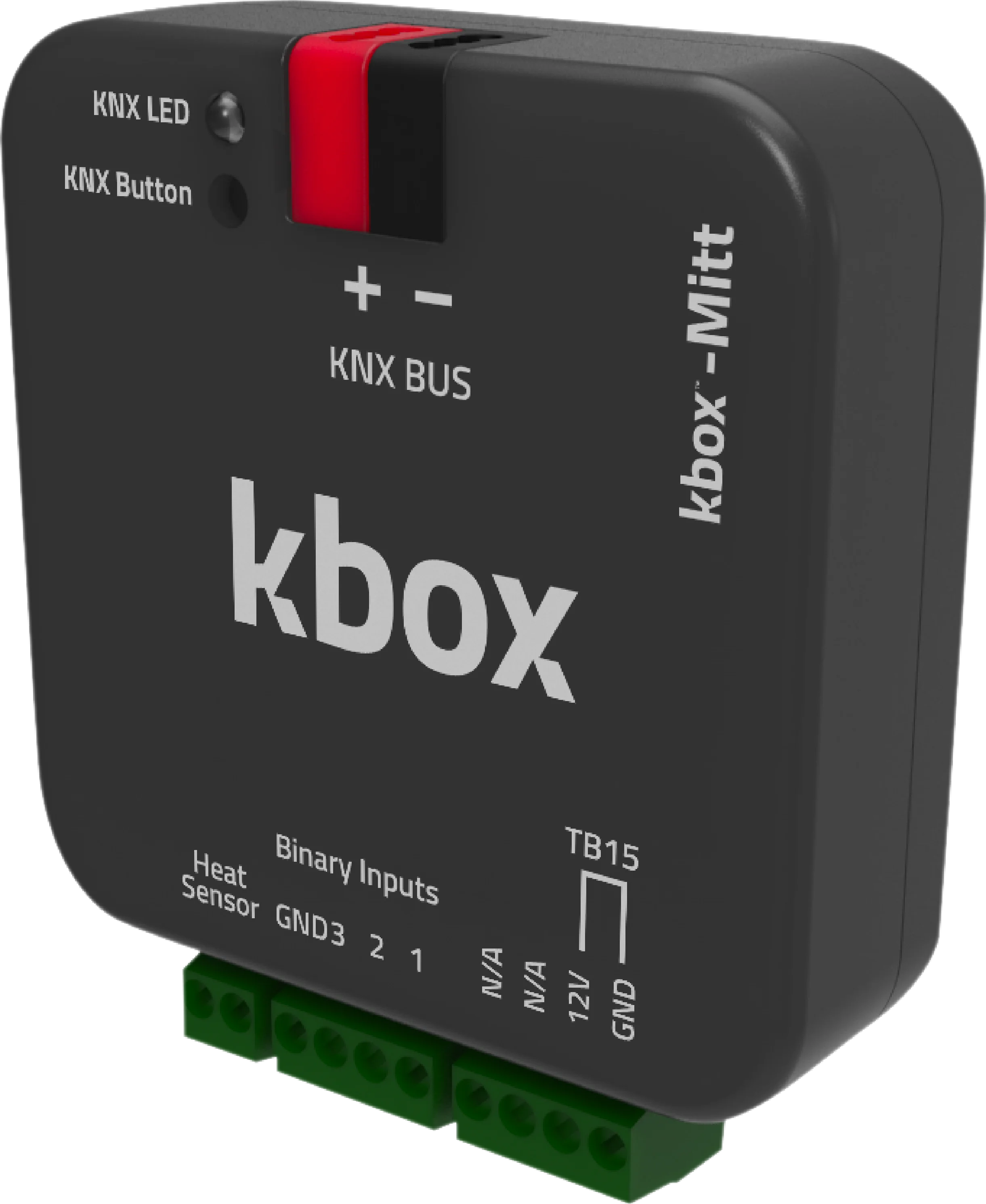
Kbox MITT TB15 is the TB15 terminal version of the gateway that connects Mitsubishi Electric air conditioners to a KNX automation system. It works with indoor units from the PAC, RAC, City Multi VRF and Mr.Slim series.
TB15 is the indoor unit's wired remote controller terminal. Kbox MITT TB15 wires into that terminal, takes the place of the controller and makes every function of the air conditioner available from KNX.
The setpoint is limited to 19–30 °C in cooling and 17–28 °C in heating — the range Mitsubishi Electric indoor units themselves accept; a value outside it is not passed to the unit. Fan is addressed as 5 levels plus Auto, the vertical vane as 5 positions plus Swing.
Integration Notes
- Required AC setting: on a TB15 connection the indoor unit must be configured to read its thermistor data (ambient temperature) from the remote controller. Without that setting the unit keeps using its own suction sensor and the room temperature you feed from KNX is ignored. See the air conditioner's service manual for the setting.
- Do not confuse it with CN105: there are two separate Kbox models for the same indoor unit family. If you will connect through the CN105 connector, use Kbox MITT CN105 — the thermistor setting is the opposite one on that model.
- Logic units: 10 "Additional Function" blocks run inside the device, each with 7 logic, 4 arithmetic, 6 comparison and 3 type-conversion operations. Scene and window contact scenarios need no extra hardware.
Documents & Downloads
Catalog Turkish
Catalog English
Datasheet
User Manual
Box Contents
- Kbox-MITT KNX gateway
- Wago KNX Terminal
Technical Specifications
| Device | Kbox MITT TB15 - Mitsubishi Electric TB15 KNX Gateway |
|---|---|
| AC brand | Mitsubishi Electric |
| Connection port | TB15 |
| Compatible indoor units | PAC, RAC, City Multi VRF, Mr.Slim |
| ETS application version | 1.0.8 |
| KNX certificate no. | 574/22153/25 (KNX v3.0.4) |
| Power supply | KNX bus (EIB) |
| Power consumption | 10 mA |
| Inputs | 3 dry contact inputs |
| Button / LED | 1 × KNX programming button · 1 × KNX programming LED |
| Operating mode | S-Mode |
| Protection class | IP20 |
| Working temperature | -10 °C … +70 °C |
| Storage temperature | -25 °C … +90 °C |
| Max. humidity | < 90 % RH |
| Dimensions | 44.5 × 19.8 × 44.5 mm |
| Configuration | ETS 5 / ETS 6 |
ETS Parameters
The device connects to the Mitsubishi Electric indoor unit through the TB15 port. The parameters below are configured in ETS.
| Operating modes | Cool / Heat / Dry / Fan Only / Auto |
|---|---|
| Fan speed | 5 levels + Auto |
| Up-Down Wing | 5 addressable positions + Swing |
| Left-Right Wing | Yes |
| Cooling setpoint range | 19 – 30 °C |
| Heating setpoint range | 17 – 28 °C |
| Ambient temperature source | From the KNX bus (From Bus) |
| Logic and arithmetic units | 10 functions, each with 7 logic, 4 arithmetic, 6 comparison and 3 type-conversion operations |
| Scene function | Yes |
| Window / occupancy / sleep contact | Yes |
KNX Group Objects
The device exposes 70 group objects. Object names are given exactly as they appear in the ETS database.
| Object | Function | Type | Flags |
|---|---|---|---|
| General | |||
| On/Off | 1: On / 0: Off | 1 bit | CWU |
| On/Off Feedback | 1: On / 0: Off | 1 bit | CRT |
| Alive Status | Alive notification | 1 bit | CRT |
| Remote Controller Lock | 1: Enabled / 0: Disabled | 1 bit | CRWU |
| Object Control Lock | 1: Enabled / 0: Disabled | 1 bit | CRWU |
| Error Status | ASCII error code | 14 bytes | CRT |
| Error Alarm | 1: On / 0: Off | 1 byte | CRT |
| Mode | |||
| Mode | Cool / Heat / Dry (Dehumidification) / Fan (Fan Only) / Auto | 1 byte | CWU |
| Mode Feedback | Cool / Heat / Dry (Dehumidification) / Fan (Fan Only) / Auto | 1 byte | CRT |
| Mode +/- | 1: Increase / 0: Decrease | 1 bit | CWU |
| Heat/Cool Mode Set | 1: Heat / 0: Cool | 1 bit | CWU |
| Cool Mode Set | 1: Enable / 0: Disable | 1 bit | CWU |
| Heat Mode Set | 1: Enable / 0: Disable | 1 bit | CWU |
| Dry (Dehumidification) Mode Set | 1: Enable / 0: Disable | 1 bit | CWU |
| Fan (Fan Only) Mode Set | 1: Enable / 0: Disable | 1 bit | CWU |
| Auto Mode Set | 1: Enable / 0: Disable | 1 bit | CWU |
| Cool Mode Feedback | 1: Enable / 0: Disable | 1 bit | CRT |
| Heat Mode Feedback | 1: Enable / 0: Disable | 1 bit | CRT |
| Dry (Dehumidification) Mode Feedback | 1: Enable / 0: Disable | 1 bit | CRT |
| Fan (Fan Only) Mode Feedback | 1: Enable / 0: Disable | 1 bit | CRT |
| Auto Mode Feedback | 1: Enable / 0: Disable | 1 bit | CRT |
| Temperature | |||
| Set Point Temperature | Temperature (°C) | 2 bytes | CWU |
| Set Point Temperature Feedback | Temperature (°C) | 2 bytes | CRT |
| Set Point Temperature +/- | 1: Increase / 0: Decrease | 1 bit | CWU |
| Ambient Temperature | Temperature (°C), min 8 / max 39 | 2 bytes | CWU |
| Ambient Temperature Feedback | Temperature (°C) | 2 bytes | CRT |
| Fan | |||
| Fan Level Set | Percentage (Scaling) | 1 byte | CWU |
| Fan Level Feedback | Percentage (Scaling) | 1 byte | CRT |
| Fan Level Set | 0…5 (Enumerated) | 1 byte | CWU |
| Fan Level Feedback | 0…5 (Enumerated) | 1 byte | CRT |
| Fan Level +/- Set | 1: Increase / 0: Decrease | 1 bit | CWU |
| Fan Auto Level | 1: Enable / 0: Disable | 1 bit | CWU |
| Fan Auto Level Feedback | 1: Enable / 0: Disable | 1 bit | CRT |
| Fan Level-1 Set | 1: Enable / 0: Disable | 1 bit | CWU |
| Fan Level-2 Set | 1: Enable / 0: Disable | 1 bit | CWU |
| Fan Level-3 Set | 1: Enable / 0: Disable | 1 bit | CWU |
| Fan Level-4 Set | 1: Enable / 0: Disable | 1 bit | CWU |
| Fan Level-5 Set | 1: Enable / 0: Disable | 1 bit | CWU |
| Fan Level-1 Feedback | 1: Enable / 0: Disable | 1 bit | CRT |
| Fan Level-2 Feedback | 1: Enable / 0: Disable | 1 bit | CRT |
| Fan Level-3 Feedback | 1: Enable / 0: Disable | 1 bit | CRT |
| Fan Level-4 Feedback | 1: Enable / 0: Disable | 1 bit | CRT |
| Fan Level-5 Feedback | 1: Enable / 0: Disable | 1 bit | CRT |
| Up-Down Wing | |||
| Up-Down Position Swing Set | 1: Enabled / 0: Disabled | 1 bit | CWU |
| Up-Down Position Swing Feedback | 1: Enabled / 0: Disabled | 1 bit | CRT |
| Up-Down Wing Set | Percentage (Scaling) | 1 byte | CWU |
| Up-Down Wing Feedback | Percentage (Scaling) | 1 byte | CRT |
| Up-Down Wing Set | 1…5 (Enumerated) | 1 byte | CWU |
| Up-Down Wing Feedback | 1…5 (Enumerated) | 1 byte | CRT |
| Up-Down Wing +/- Set | 1: Increase / 0: Decrease | 1 bit | CWU |
| Up-Down Wing Position 1 Set | 1: Set Position 1 / 0: NA | 1 bit | CWU |
| Up-Down Wing Position 2 Set | 1: Set Position 2 / 0: NA | 1 bit | CWU |
| Up-Down Wing Position 3 Set | 1: Set Position 3 / 0: NA | 1 bit | CWU |
| Up-Down Wing Position 4 Set | 1: Set Position 4 / 0: NA | 1 bit | CWU |
| Up-Down Wing Position 5 Set | 1: Set Position 5 / 0: NA | 1 bit | CWU |
| Up-Down Wing Position 1 Feedback | 1: Active / 0: Inactive | 1 bit | CRT |
| Up-Down Wing Position 2 Feedback | 1: Active / 0: Inactive | 1 bit | CRT |
| Up-Down Wing Position 3 Feedback | 1: Active / 0: Inactive | 1 bit | CRT |
| Up-Down Wing Position 4 Feedback | 1: Active / 0: Inactive | 1 bit | CRT |
| Up-Down Wing Position 5 Feedback | 1: Active / 0: Inactive | 1 bit | CRT |
| Left-Right Wing | |||
| Left-Right Position Swing Set | 1: Enabled / 0: Disabled | 1 bit | CWU |
| Left-Right Position Swing Feedback | 1: Enabled / 0: Disabled | 1 bit | CRT |
| Energy Saving | |||
| Window Contact | 1: Enable / 0: Disable | 1 bit | CWU |
| Window Contact Feedback | 1: Enable / 0: Disable | 1 bit | CRT |
| Occupancy Contact | 1: Enable / 0: Disable | 1 bit | CWU |
| Occupancy Contact Feedback | 1: Enable / 0: Disable | 1 bit | CRT |
| Sleep Contact | 1: Enable / 0: Disable | 1 bit | CWU |
| Digital Inputs | |||
| Digital Input 1 | 1: Active / 0: Passive | 1 bit | CWU |
| Digital Input 2 | 1: Active / 0: Passive | 1 bit | CWU |
| Digital Input 3 | 1: Active / 0: Passive | 1 bit | CWU |
Flags: C = Communication, R = Read, W = Write, T = Transmit, U = Update.