
Kbox MITT TB15 - Mitsubishi Electric TB15 KNX Gateway
Características do Produto
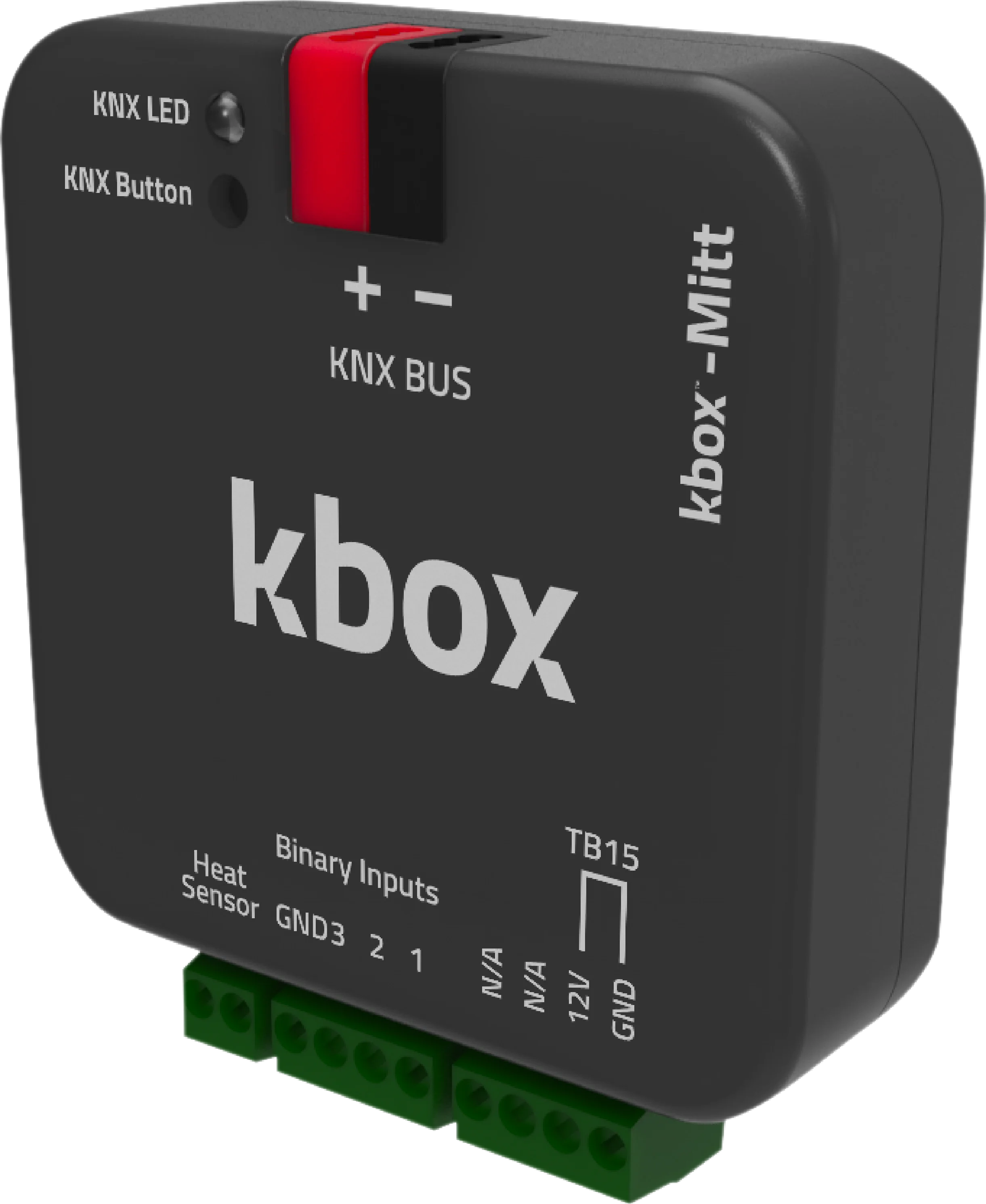
kbox-Mitt é um gateway KNX que permite a comunicação bidirecional entre sistemas de casa inteligente KNX e sistemas de ar condicionado Mitsubishi Electric.
Com kbox-Mitt, todas as funções dos ar condicionados Mitsubishi Electric podem ser controladas através do sistema KNX. Facilita a comunicação bidirecional perfeita, transmitindo dados de temperatura em tempo real de smartphones, tablets, computadores ou controladores KNX para a unidade interna do ar condicionado.
kbox-Mitt trabalha eficientemente com vários cenários, garantindo nenhuma carga adicional no sistema de casa inteligente. Suporta economia de energia, limites de temperatura, agendamento e programação de operação. Comandos em tempo real adaptados a esses cenários são enviados, melhorando a eficiência energética.
Ao contrário dos concorrentes, kbox-Mitt se distingue transferindo dados de temperatura ambiente do painel KNX para o ar condicionado via porta TB15. Esta abordagem única garante operação estável, temperaturas internas confortáveis e eficiência energética superior.
Os produtos concorrentes frequentemente usam a porta CN105 para transmissão de dados, que não é otimizada para atualizações de temperatura ambiente em tempo real. Isso resulta em ineficiência energética e controle de temperatura menos preciso. kbox-Mitt, o único gateway KNX globalmente compatível com ar condicionados Mitsubishi Electric através da porta TB15, oferece uma vantagem significativa de custo sobre os concorrentes.
Com suas características excepcionais, kbox-Mitt é o gateway KNX mais eficiente para sua casa inteligente.
Documentos e Downloads
Catálogo Turco
Catálogo Inglês
Ficha Técnica
Manual do Usuário
Conteúdo da Caixa
- Gateway KNX Kbox-MITT
- Terminal Wago KNX
Lista de Compatibilidade
| UNIDADES INTERNAS TIPO PAC | UNIDADES INTERNAS TIPO RAC | UNIDADES INTERNAS TIPO CITY MULTI VRF |
| PCA-RP | MFZ-KA | PCFY-P … VKM-ER |
| PEAD-RP | MFZ-KJ | PEFY-P … VMA-E |
| PEAD-SP | MLZ-KA | PEFY-P … VMA-ER3 |
| PLA-RP | MSZ-CGE | PEFY-P … VMAL-E |
| PLA-ZRP | MSZ-EF | PEFY-P … -VMH(S)-E1 |
| PKA-RP | MSZ-FA | PEFY-P … VMR-E1 |
| PSA-RP | MSZ-FD | PEFY-P … VMS1-E |
| SEZ-KA/KC | MSZ-FH | PFFY-P … VKM-E2 |
| SEZ-KD | MSZ-GA | PFFY-P … VLRM/LEM |
| SLZ-KA | MSZ-GB | PFFY-P … VLRMM-E¹ |
| SLZ-KF | MSZ-GC | PFFY-P … VFM-E |
| PEAD-RP…JALQR3 | MSZ-GE | PKFY-P … VHM-ER2¹ |
| MSZ-GF | PKFY-P … VKM-ER1¹ | |
| MSZ-SF | PLFY-P … VBM-ER3¹ | |
| MSZ-DM | PLFY-P … VCM-ER2¹ | |
| MSZ-LN | PLFY-P … VLDM-E | |
| MSZ-WN | PMFY-P … VBM-E#2 | |
| PMFY-P … VBM-ER3 | ||
| PMFY-P … VBM-ER41 |
Especificações Técnicas
| Dispositivo | Kbox MITT TB15 - Mitsubishi Electric TB15 KNX Gateway |
|---|---|
| Marca do ar condicionado | Mitsubishi Electric |
| Porta de ligação | TB15 |
| Unidades interiores compatíveis | PAC, RAC, City Multi VRF, Mr.Slim |
| Versão da aplicação ETS | 1.0.8 |
| N.º de certificado KNX | 574/22153/25 (KNX v3.0.4) |
| Alimentação | KNX bus (EIB) |
| Consumo | 10 mA |
| Entradas | 3 entradas de contacto seco |
| Botão / LED | 1 × KNX programming button · 1 × KNX programming LED |
| Modo de funcionamento | S-Mode |
| Grau de proteção | IP20 |
| Temperatura de funcionamento | -10 °C … +70 °C |
| Temperatura de armazenamento | -25 °C … +90 °C |
| Humidade máx. | < 90 % RH |
| Dimensões | 44.5 × 19.8 × 44.5 mm |
| Configuração | ETS 5 / ETS 6 |
Parâmetros ETS
O dispositivo liga-se à unidade interior Mitsubishi Electric através da porta TB15. Os parâmetros abaixo são configurados no ETS.
| Modos de funcionamento | Cool / Heat / Dry / Fan Only / Auto |
|---|---|
| Velocidade do ventilador | 5 níveis + Auto |
| Palheta vertical (Up-Down Wing) | 5 posições endereçáveis + Swing |
| Palheta horizontal (Left-Right Wing) | Sim |
| Intervalo de setpoint em refrigeração | 19 – 30 °C |
| Intervalo de setpoint em aquecimento | 17 – 28 °C |
| Fonte da temperatura ambiente | Pelo bus KNX (From Bus) |
| Unidades lógicas e aritméticas | 10 funções, cada uma com 7 operações lógicas, 4 aritméticas, 6 de comparação e 3 de conversão de tipo |
| Função de cenários (Scene) | Sim |
| Contacto de janela / presença / sleep | Sim |
Objetos de Grupo KNX
O dispositivo disponibiliza 70 objetos de grupo. Os nomes dos objetos são apresentados exatamente como constam na base de dados ETS.
| Objeto | Função | Tipo | Flags |
|---|---|---|---|
| General | |||
| On/Off | 1: On / 0: Off | 1 bit | CWU |
| On/Off Feedback | 1: On / 0: Off | 1 bit | CRT |
| Alive Status | Alive notification | 1 bit | CRT |
| Remote Controller Lock | 1: Enabled / 0: Disabled | 1 bit | CRWU |
| Object Control Lock | 1: Enabled / 0: Disabled | 1 bit | CRWU |
| Error Status | ASCII error code | 14 bytes | CRT |
| Error Alarm | 1: On / 0: Off | 1 byte | CRT |
| Mode | |||
| Mode | Cool / Heat / Dry (Dehumidification) / Fan (Fan Only) / Auto | 1 byte | CWU |
| Mode Feedback | Cool / Heat / Dry (Dehumidification) / Fan (Fan Only) / Auto | 1 byte | CRT |
| Mode +/- | 1: Increase / 0: Decrease | 1 bit | CWU |
| Heat/Cool Mode Set | 1: Heat / 0: Cool | 1 bit | CWU |
| Cool Mode Set | 1: Enable / 0: Disable | 1 bit | CWU |
| Heat Mode Set | 1: Enable / 0: Disable | 1 bit | CWU |
| Dry (Dehumidification) Mode Set | 1: Enable / 0: Disable | 1 bit | CWU |
| Fan (Fan Only) Mode Set | 1: Enable / 0: Disable | 1 bit | CWU |
| Auto Mode Set | 1: Enable / 0: Disable | 1 bit | CWU |
| Cool Mode Feedback | 1: Enable / 0: Disable | 1 bit | CRT |
| Heat Mode Feedback | 1: Enable / 0: Disable | 1 bit | CRT |
| Dry (Dehumidification) Mode Feedback | 1: Enable / 0: Disable | 1 bit | CRT |
| Fan (Fan Only) Mode Feedback | 1: Enable / 0: Disable | 1 bit | CRT |
| Auto Mode Feedback | 1: Enable / 0: Disable | 1 bit | CRT |
| Temperature | |||
| Set Point Temperature | Temperature (°C) | 2 bytes | CWU |
| Set Point Temperature Feedback | Temperature (°C) | 2 bytes | CRT |
| Set Point Temperature +/- | 1: Increase / 0: Decrease | 1 bit | CWU |
| Ambient Temperature | Temperature (°C), min 8 / max 39 | 2 bytes | CWU |
| Ambient Temperature Feedback | Temperature (°C) | 2 bytes | CRT |
| Fan | |||
| Fan Level Set | Percentage (Scaling) | 1 byte | CWU |
| Fan Level Feedback | Percentage (Scaling) | 1 byte | CRT |
| Fan Level Set | 0…5 (Enumerated) | 1 byte | CWU |
| Fan Level Feedback | 0…5 (Enumerated) | 1 byte | CRT |
| Fan Level +/- Set | 1: Increase / 0: Decrease | 1 bit | CWU |
| Fan Auto Level | 1: Enable / 0: Disable | 1 bit | CWU |
| Fan Auto Level Feedback | 1: Enable / 0: Disable | 1 bit | CRT |
| Fan Level-1 Set | 1: Enable / 0: Disable | 1 bit | CWU |
| Fan Level-2 Set | 1: Enable / 0: Disable | 1 bit | CWU |
| Fan Level-3 Set | 1: Enable / 0: Disable | 1 bit | CWU |
| Fan Level-4 Set | 1: Enable / 0: Disable | 1 bit | CWU |
| Fan Level-5 Set | 1: Enable / 0: Disable | 1 bit | CWU |
| Fan Level-1 Feedback | 1: Enable / 0: Disable | 1 bit | CRT |
| Fan Level-2 Feedback | 1: Enable / 0: Disable | 1 bit | CRT |
| Fan Level-3 Feedback | 1: Enable / 0: Disable | 1 bit | CRT |
| Fan Level-4 Feedback | 1: Enable / 0: Disable | 1 bit | CRT |
| Fan Level-5 Feedback | 1: Enable / 0: Disable | 1 bit | CRT |
| Up-Down Wing | |||
| Up-Down Position Swing Set | 1: Enabled / 0: Disabled | 1 bit | CWU |
| Up-Down Position Swing Feedback | 1: Enabled / 0: Disabled | 1 bit | CRT |
| Up-Down Wing Set | Percentage (Scaling) | 1 byte | CWU |
| Up-Down Wing Feedback | Percentage (Scaling) | 1 byte | CRT |
| Up-Down Wing Set | 1…5 (Enumerated) | 1 byte | CWU |
| Up-Down Wing Feedback | 1…5 (Enumerated) | 1 byte | CRT |
| Up-Down Wing +/- Set | 1: Increase / 0: Decrease | 1 bit | CWU |
| Up-Down Wing Position 1 Set | 1: Set Position 1 / 0: NA | 1 bit | CWU |
| Up-Down Wing Position 2 Set | 1: Set Position 2 / 0: NA | 1 bit | CWU |
| Up-Down Wing Position 3 Set | 1: Set Position 3 / 0: NA | 1 bit | CWU |
| Up-Down Wing Position 4 Set | 1: Set Position 4 / 0: NA | 1 bit | CWU |
| Up-Down Wing Position 5 Set | 1: Set Position 5 / 0: NA | 1 bit | CWU |
| Up-Down Wing Position 1 Feedback | 1: Active / 0: Inactive | 1 bit | CRT |
| Up-Down Wing Position 2 Feedback | 1: Active / 0: Inactive | 1 bit | CRT |
| Up-Down Wing Position 3 Feedback | 1: Active / 0: Inactive | 1 bit | CRT |
| Up-Down Wing Position 4 Feedback | 1: Active / 0: Inactive | 1 bit | CRT |
| Up-Down Wing Position 5 Feedback | 1: Active / 0: Inactive | 1 bit | CRT |
| Left-Right Wing | |||
| Left-Right Position Swing Set | 1: Enabled / 0: Disabled | 1 bit | CWU |
| Left-Right Position Swing Feedback | 1: Enabled / 0: Disabled | 1 bit | CRT |
| Energy Saving | |||
| Window Contact | 1: Enable / 0: Disable | 1 bit | CWU |
| Window Contact Feedback | 1: Enable / 0: Disable | 1 bit | CRT |
| Occupancy Contact | 1: Enable / 0: Disable | 1 bit | CWU |
| Occupancy Contact Feedback | 1: Enable / 0: Disable | 1 bit | CRT |
| Sleep Contact | 1: Enable / 0: Disable | 1 bit | CWU |
| Digital Inputs | |||
| Digital Input 1 | 1: Active / 0: Passive | 1 bit | CWU |
| Digital Input 2 | 1: Active / 0: Passive | 1 bit | CWU |
| Digital Input 3 | 1: Active / 0: Passive | 1 bit | CWU |
Flags: C = Comunicação, R = Leitura, W = Escrita, T = Transmissão, U = Atualização.